A website can spend months publishing content, updating pages and targeting keywords, while still struggling to gain meaningful traction in search results. At first glance, it may seem as though more content is needed or that rankings simply take time. The real issue is often less obvious. Effort is being invested – but it is not being guided by a clear strategy.
Long-term SEO success is rarely the result of isolated actions. It is built when different activities work together toward a specific objective. A well-planned-and-carefully-executed strategy creates direction, helping businesses focus on what actually moves the needle. While short-term improvements can happen, sustainable growth is usually achieved when every SEO decision supports a larger goal.
Start With A Direction, Not A Checklist
Many SEO campaigns begin with tasks. Keywords are researched. Content is published. Technical audits are performed. While these activities matter, they should not come before a clear destination.
An SEO strategy should be tied directly to business goals. More traffic sounds appealing – but what kind of traffic is actually needed? Should local visibility be improved? Should service-related leads be increased? Should a business become more visible for industry-specific searches?
Without a defined objective, effort can be scattered across dozens of activities that produce limited value.
This is also where authority-building enters the conversation. Many organizations invest in content creation while also exploring SEO link building services to strengthen their visibility and credibility. When authority is developed alongside useful content, stronger results are often achieved.
A strategy should answer one important question early on: what does success actually look like? Once that answer is established, every SEO decision becomes easier to make.
Know What Deserves Your Attention
Not every page on a website deserves the same level of attention. Some pages drive business value. Others simply exist.
Before new content is created, existing assets should be evaluated carefully. Rankings should be reviewed. Traffic patterns should be examined. User behavior should be analyzed.
For example, a service page ranking near the bottom of page one may require updated content rather than a complete rewrite. In another case, a blog post attracting visitors may benefit from stronger internal links.
Many businesses focus heavily on creating more pages, while valuable opportunities remain hidden inside existing content.
Would it make sense to ignore pages that are already close to delivering stronger results?
An effective strategy focuses attention where meaningful gains can be achieved.
Build Around Priorities That Matter
SEO becomes difficult when everything feels urgent. Priorities help create structure.
A long-term strategy should focus on activities that support growth consistently:
Target keywords with business value
Improve pages that already show ranking potential
Strengthen internal linking structures
Address technical issues affecting performance
Build authority through relevant external mentions
Review performance data regularly
These priorities create focus. They also reduce the temptation to chase every trend that appears.
Search engines change. Competitors adjust their strategies. New opportunities emerge. Businesses that remain focused on their priorities are often better positioned than those constantly changing direction.
Create Content With Purpose, Not Volume
Content remains a major part of SEO – but quantity alone rarely produces lasting results.
Every piece of content should serve a purpose. Some pages are designed to educate. Others help visitors evaluate solutions. Some pages support purchasing decisions.
When content aligns with user intent, stronger engagement is often generated. Visitors find what they expected to find. Search engines recognize that relevance.
Consider a software company creating a detailed guide for businesses researching workflow automation. That content serves a different purpose than a product comparison page. Both are valuable, although they support different stages of the decision-making process.
What happens when content answers questions clearly and directly? Visitors tend to stay longer and trust is more easily developed.
A content strategy should focus on usefulness before volume. Useful content continues working long after publication.
Measure Progress Beyond Rankings
Rankings receive a great deal of attention. They should. However, they should not be treated as the only indicator of success. Traffic quality matters. Lead generation matters. User engagement matters. Business outcomes matter.
A keyword may move higher in search results while conversions remain unchanged. Traffic may increase while visitor quality declines. Looking only at rankings can create a misleading picture.
Reports should explain what changed and why it changed. Decisions should be influenced by data rather than assumptions. When performance is measured properly, adjustments can be made with confidence.
Can meaningful growth be achieved without understanding which efforts are producing results?
An SEO strategy should never remain frozen after it has been created. It should be reviewed regularly. Refinements should be made as new insights become available. Search behavior changes. Competitors evolve. Opportunities appear.Long-term SEO success is rarely created through isolated tactics. It is built through focus, consistency and informed decision-making. When every action supports a larger objective, growth becomes easier to sustain and the results become far more valuable to the business.
We’ve built on both. We have clients who’ve come to us having outgrown Wix, frustrated that they can’t get the functionality they need without a full rebuild on a different platform. We also have clients who’ve tried WordPress, got overwhelmed by the setup, and never published anything because they were stuck in plugin configuration purgatory.
Neither platform is wrong. But one of them is probably wrong for you, and making the right call upfront saves a significant amount of time and money down the line. Here’s how we actually think about this WordPress vs Wix comparison.
WordPress and Wix: What Are They?
The distinction that matters isn’t the feature list. It’s the ownership model.
WordPress.org is software, not a service. You install it on hosting you arrange separately, and everything (the files, the database, the design) lives under your control. 41.9% of all websites globally run on WordPress. That’s not a coincidence. It’s the result of two decades of developer investment and an ecosystem of plugins and themes that means almost any requirement has a solution already built.
Wix is a subscription product. You pay monthly, your site lives on their servers, and you build inside their editor. That’s not a criticism. The trade-off is that Wix handles infrastructure so you don’t have to. But it’s worth understanding before you start that your site exists within Wix’s constraints, not independently of them.
We’ve seen businesses on Wix for three or four years, perfectly happy, until they want to do something the platform doesn’t support. At that point there’s no migration path. You rebuild. That’s the risk. It doesn’t always materialise, but it’s real.
Ease of Use: Which Is Simpler to Manage?
Wix is easier. Full stop. The editor is intuitive, the learning curve is shallow, and a non-technical person can build something genuinely presentable in a day. Hosting is included, security updates happen automatically, and you don’t need to understand what a PHP version is.
WordPress requires more. There’s the initial setup: choosing hosting, installing the software, picking a theme, adding plugins for the things Wix includes by default. None of it is especially difficult, but the decisions stack up. And once the site is live, it needs ongoing attention. Plugin conflicts happen. Updates break things occasionally. Sooner or later, something will need a developer.
For a small business owner who’ll be managing the site solo, with limited time and no interest in learning the technical side, Wix is the more honest recommendation. We’ve seen enough abandoned WordPress sites to know that “technically possible” and “practically manageable” aren’t the same thing.
Design Flexibility: Where Does Each Platform Win?
Wix gives you genuine design freedom within its editor. You can place elements where you want them, resize things freely, choose from a wide template library. For most small business websites, the visual output is perfectly strong.
Where it shows its limits is when requirements move beyond what the editor was designed for. Custom post types, dynamic content, complex multi-step layouts, anything that needs to behave differently based on user data. These things hit a wall on Wix. Not because Wix is badly built, but because the simplicity that makes it accessible comes from constraining what’s possible.
WordPress has no equivalent ceiling. A developer can build essentially anything on it. That’s why it’s the platform our WordPress development agency team defaults to for anything with complex requirements. You can see the range in how we built Business Launchpad’s website. The kind of functionality on that build simply isn’t achievable on a hosted builder.
SEO Capabilities: The Real Difference
Wix’s SEO has improved substantially. You can now edit meta titles, descriptions, header tags and alt text without workarounds. Google Search Console integration works. Basic on-page SEO is doable.
But SEO at any serious scale needs more than basics. WordPress with a plugin like Yoast or Rank Math gives you granular control over crawl behaviour, canonical tags, schema markup, XML sitemaps and redirect management. More importantly, it gives your SEO specialist or agency the access they need to do their job properly. Wix’s closed architecture means there are elements you simply can’t touch.
The structural argument is stronger still. A content-led SEO strategy involves dozens or hundreds of pages, category structures, internal linking logic, and technical configurations that compound over time. Wix can support a blog. It doesn’t support serious content architecture. For the best website builder for small business UK purposes, if SEO is a meaningful channel for you, this is the point where WordPress becomes the only practical answer.
Ecommerce: WooCommerce vs Wix Stores
For a business selling a small product range with a straightforward checkout, Wix Stores works fine. It’s quick to set up and doesn’t require any technical knowledge.
The moment requirements get more complex (subscription products, variable pricing tiers, custom shipping logic, wholesale accounts, integration with a fulfilment system), Wix Stores starts to strain. Apps can extend it to a point, but you’re stacking paid subscriptions onto an already limited foundation.
WooCommerce handles serious ecommerce well. It’s free at its core, deeply extensible, and integrates with practically every major third-party system. The trade-off is setup complexity and the ongoing maintenance that comes with any WordPress install. For a business where ecommerce is central to the operation, that’s a reasonable trade.
Neither platform is the right choice for high-volume retail. Shopify owns that space. But for small stores, the question comes down to how much growth you’re anticipating.
Costs: What You’ll Actually Pay Over Time
Wix pricing runs from roughly £10 a month for a basic site to £22-25 for ecommerce. Everything included. No hosting bill, no plugin subscriptions, no surprise costs from a failed update requiring developer time.
WordPress costs are more variable. Budget hosting starts at £5-10 a month. A quality theme is typically a one-off £50-100. Then SEO, security, performance and form plugins: probably another £150-200 annually. A custom build from an agency costs more than a Wix equivalent upfront.
But the comparison shifts over time. Wix subscription costs compound and pricing has risen consistently. A WordPress site built properly tends to have modest ongoing costs once it’s established. And if you build on Wix and outgrow it, the migration isn’t free. We’ve had clients come to us after two or three years on Wix needing exactly that work. By that point, the apparent savings from the cheaper platform have long evaporated.
Maintenance and Security
This is where Wix has a clear, practical advantage for non-technical owners. Platform updates, security patches, backups: all managed by Wix. You don’t think about it.
WordPress needs active maintenance. Updates to core, themes and plugins need to happen regularly. Outdated installs are the most common cause of compromised WordPress sites. It’s not that WordPress is insecure (a well-maintained site is extremely safe), but maintenance has to be someone’s responsibility.
That someone is either you, your hosting provider if you’re on a managed plan, or an agency. We handle this for clients as part of ongoing support. If maintenance is a concern, it shouldn’t be a reason to avoid WordPress. It should be a reason to factor that support into the budget.
Which Platform Should You Choose?
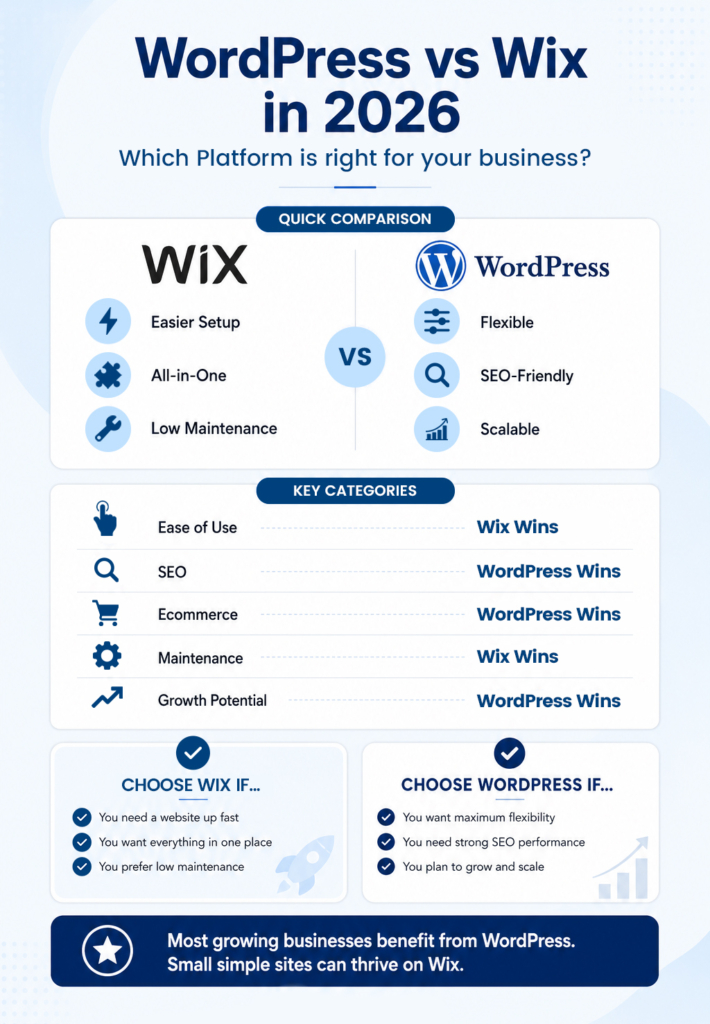
For most businesses we work with, the answer is WordPress. Not because it’s always the superior product in isolation, but because ambitions for a website tend to grow. What’s a five-page site today is often a ten-page site with a blog, landing pages and integrations a year later. WordPress handles that progression. Wix tends to hit its ceiling at exactly the moment a business starts taking its web presence seriously.
That said, Wix is the right call for some businesses. If you need something up quickly, you’ll be managing it yourself, the site is relatively simple, and search isn’t a primary growth channel, it does the job well. We offer Wix website design services and we’ll always recommend whichever platform actually fits the brief rather than defaulting to one answer.
It’s also worth knowing that this WordPress vs Wix comparison doesn’t cover every option. There are newer builders (Webflow, Framer, Lovable) that sit in interesting positions between the two. We’ve written about comparing WordPress against other modern builders if you want to weigh those up before deciding.Not sure which direction makes sense for your project? Talk to us about your website build.
Competitive market research has always been quite demanding, but the digital landscape has made it considerably more complex. Prices shift unexpectedly, rivals operate across multiple regions, and the intelligence you need sits behind geographic restrictions or aggressive bot-detection systems. Analysts who integrate proxies from Dataimpulse or other service providers into their workflow tend to gather richer, more reliable data — and with far fewer gaps in the process.
1. Accessing Geo-Restricted Pricing Data
Pricing is rarely consistent across markets, and that inconsistency represents a genuine intelligence gap for anyone who ignores it. A software licence might cost significantly less in Central Europe than in the UK, or a retailer may run region-specific promotions that simply never appear when you browse from your own location. The only reliable way to see what local buyers actually see is to route your requests through an IP address in that specific country, city, or postal district.
Modern proxy infrastructure supports targeting at the country, state, city, and postcode levels, which gives researchers a degree of granularity that a standard VPN cannot match. The difference between country-level and city-level access alone can surface pricing variations that would otherwise go entirely undetected.
2. Avoiding IP Bans at Scale
Why Automated Requests Get Flagged
Repeated requests from the same IP address will eventually trigger a block on almost any site worth collecting from. This is not a theoretical risk; it is a near certainty for anyone running large-scale data collection without the right proxy infrastructure.
How Rotation Changes the Equation
Rotating proxies assign a different IP address to each request or at configurable intervals, so the target server sees what appears to be ordinary organic traffic. Residential proxies are particularly effective for this purpose because they use IP addresses associated with real consumer devices rather than server hardware, which makes them considerably harder for detection systems to detect as automated.
3. Real-Time Competitor Price Monitoring
In e-commerce, pricing is a live variable. Competitors adjust rates in response to stock levels, demand cycles, promotional calendars, and what rivals are charging at any given moment. By the time a manual check is complete, the data you have is already stale.
Automated monitoring tools require the right proxy session mode to function reliably:
Rotating sessions suit high-volume scraping where each request is independent,
Sticky sessions are better suited to tasks requiring continuous interaction, such as checking a logged-in price or stepping through a simulated checkout flow.
Understanding which mode fits which task is the difference between a monitoring pipeline that runs consistently and one that breaks at the worst possible moment.
4. Localised SERP Tracking
Search results are not uniform across locations. The rankings your competitor holds in Manchester may look entirely different in Munich or Madrid, and those differences reflect genuine variations in how search engines weigh local relevance. For businesses operating internationally, SEO analysis that ignores geographic segmentation is always working from a partial picture.
Proxies with city-level and postcode-level targeting allow researchers to pull genuinely localised results. Support for the HTTPS and SOCKS5 protocols means these setups can integrate with a wide range of tracking and scraping tools without compatibility issues.
5. Aggregating Review and Sentiment Data
Customer reviews reveal what buyers genuinely think about a rival’s product, stripped of the framing that official marketing applies. Recurring negative themes are especially telling — they point directly to gaps in the competitor’s offer that your own product might address.
Review platforms aggressively rate-limit automated requests, which means brief collection windows rarely yield a sample worth acting on. A geographically distributed proxy pool, with addresses spread across multiple regions, allows researchers to gather data across several platforms simultaneously and build a dataset large enough to reveal genuine patterns rather than noise.
1. Monitoring Competitor Ads
Paid advertising strategies vary considerably by location. A brand might run aggressive campaigns in London while testing entirely different messages in Belfast. Remarketing campaigns in particular are essentially invisible unless you happen to be browsing from precisely the right location.
Mobile proxies, which route traffic through real devices operating on 4G and 5G networks, deserve particular consideration here. Many ad networks serve different creatives to mobile users than to desktop visitors, which means genuine mobile IPs can surface campaigns that a standard residential or datacenter setup would miss entirely.
2. Anonymous Website Auditing
Residential and mobile IPs blend into ordinary traffic convincingly, allowing site audits, content change tracking, and UX reviews to proceed without leaving an obvious signature in the competitor’s data. Datacenter proxies, while faster and more cost-effective, are easier to identify, which makes them a poor choice for tasks where anonymity genuinely matters.
3. Tracking Industry Signals Beyond Product Pages
Press coverage, job postings, executive commentary, and niche forum discussions all carry signals worth monitoring. A competitor advertising heavily for engineers and product managers in a new region is effectively announcing its expansion plans, whether it intends to or not.
Many of these sources apply geographic filters or throttle automated access at critical moments, which can break monitoring feeds when you can least afford it. A proxy setup with stable, distributed coverage across a broad range of regions keeps access to those sources consistent over time, so the picture you build reflects what is actually happening rather than what the pipeline happened to reach before hitting a wall.
Putting It Together
These eight approaches reflect how competitive intelligence teams that consistently outperform their rivals actually operate. Accurate, geographically precise, and uninterrupted data access is the thread connecting them. Teams that invest in proper proxy infrastructure price more sharply, react more quickly, and build a picture of competitor activity with a reliability that purely manual approaches simply cannot replicate.
A client came to us a while back convinced their website was broken. They had a professional site, decent content, had been trading for eight years. But when someone in their town searched for the service they offered, they were nowhere. A competitor two streets away was showing up in three different places on the first page.
The site wasn’t broken. They just had no local SEO to speak of.
Local search and regular organic search aren’t the same thing. A business can rank well for broad terms and be completely invisible to someone searching from half a mile away. This local SEO guide covers what’s actually happening when Google returns location-based results, why you might be missing from them, and what to do about it.
What Is Local SEO?
Local SEO is how your business gets found when someone nearby searches for what you do. Not found generally. Found specifically by people who are ready to call, visit or book.
When someone types “plumber in Manchester” or “solicitor near me”, Google doesn’t just return web pages. It returns a map, a cluster of three businesses, phone numbers, opening hours and star ratings before the user has clicked a single thing. That cluster is the Local Pack and it operates entirely separately from the organic results below it.
Understanding what local SEO is means understanding that these two visibility systems need different things from you. Your website’s domain authority matters for organic rankings. The Local Pack is driven by your Google Business Profile, your reviews, and whether the broader internet consistently agrees on who you are and where you are.
Most businesses treat them as the same problem. They’re not. And that’s usually where the gap in local visibility comes from. Local SEO for small business is a distinct discipline and getting it right requires focusing on the right set of signals.
How Does the Google Local Pack Work?
Google decides who appears in the Pack based on three things: how relevant your business is to the search, how close you are to the person searching, and how well-established and trusted your business appears across the web.
Distance is largely fixed. You can’t change where you are. But relevance and trust are very much within your control, which is the encouraging part of what local SEO involves.
A business ten miles from the searcher with a fully optimised profile, 150 recent reviews and consistent directory listings will regularly beat a closer business that barely has a claimed Google listing. We’ve seen it repeatedly with clients. Geography helps but it doesn’t win on its own.
The practical upshot is that local search optimisation effort compounds over time. The businesses that dominate their local Pack tend to be the ones who’ve been consistently working the controllable factors for a year or more, not the ones who did a one-time setup and forgot about it.
Your Google Business Profile: The Foundation of Local SEO
If you only take one thing from this local SEO guide for small business, make it this: your Google Business Profile (GBP) matters more than almost anything else for local visibility and it’s completely free to manage.
We’ve audited businesses with excellent websites and solid backlink profiles who were barely showing up locally because their GBP was incomplete or hadn’t been updated since it was first claimed. Sorting the profile made a visible difference within weeks in both cases.
A complete profile means: accurate name, address and phone number, the correct primary category (getting it wrong undermines everything else, and it’s the most commonly misconfigured element we see), a properly written description with relevant terms, verified opening hours, and a set of quality photos. Not the one blurry stock image uploaded when the account was first created.
The part most businesses miss is ongoing activity. Google Posts let you publish updates directly to your listing. The Q&A section lets you pre-populate answers to questions customers actually ask. Your listing is a channel, not a directory entry. Treat it as one.
Our local SEO checklist walks through the full GBP setup if you want a step-by-step version of this.
NAP Citations and Directory Listings
NAP stands for Name, Address, Phone number. Anywhere your business appears online should show these three details in exactly the same format. Not approximately the same. Exactly.
A company trading as “Harrison & Sons Electrical” in one place and “Harrison and Sons Electrical” in another, with different phone number formatting across platforms, sends conflicting signals to Google. It’s a small thing individually but the cumulative effect on local trust signals is real.
The directories worth targeting for a UK business are Google Business Profile, Bing Places, Apple Maps, Yell and any sector-specific platforms that apply to your industry. A tradesperson should be on Checkatrade. A restaurant should have a TripAdvisor listing. A professional services firm should be in any relevant trade body directory. The logic is the same across all of them: consistent information, complete profiles, right categories.
Citation building isn’t glamorous. But skipping it and then wondering why a less impressive competitor is ranking above you in your own postcode is a common experience for businesses that overlook it.
Local Keywords: How to Rank for “Near Me” Searches
Something worth knowing: you don’t need to write the phrase “near me” anywhere on your website for Google to serve your business in near me searches. Google uses the searcher’s location to determine relevance. What you need is for Google to know clearly what you do and where you do it.
That clarity comes from your on-page content. A solicitor based in Exeter whose website talks about legal services without once mentioning Exeter is missing a significant local relevance signal. Not stuffed into a single hidden keyword, but woven naturally into the copy, the title tags, the headings.
For businesses covering multiple areas, location-specific pages beat a generic “we cover the whole region” statement every time. Each page should be written for that area with something specific to say, not just a templated page with the town name swapped in. Google is very good at spotting the difference and the latter tends to rank poorly.
A good local SEO guide for small business will tell you that service-plus-location keyword combinations (“emergency electrician Bristol”, “wedding photographer Edinburgh”) carry clearer intent and are easier to target deliberately than “near me” variants. Build your keyword strategy around these and the near me visibility tends to come with it.
Reviews and Their Impact on Local Rankings
Reviews are both a ranking signal and the first thing a potential customer looks at once you do appear. Getting both aspects right matters.
BrightLocal’s consumer review research shows that 31% of consumers will only use a business with a 4.5-star rating or above, and that reviews from the last three months carry significantly more weight than older ones. A business with 200 reviews and nothing recent looks stagnant compared to a competitor with 60 reviews and a steady stream appearing week by week.
Asking for reviews needs to be built into your process. Most satisfied customers won’t leave one unprompted. A simple follow-up message after a job is completed, a QR code on a receipt, a link in your email footer. Whichever fits your business, the important thing is consistency. The businesses with the strongest review profiles aren’t just lucky. They ask.
On responses: every review that goes unanswered is a small missed signal to Google that your listing is active. And for the negative ones, a professional, specific public response does more for your reputation than no response, nearly every time.
On-Page Local SEO Signals
Your website reinforces (or contradicts) what your Google Business Profile says about you. Most of the on-page local SEO tips UK businesses need aren’t technical. They’re just often ignored.
Your NAP details should be on your website, formatted consistently, ideally in the footer. Your service pages need your location in the title tag, not buried in a paragraph. “Family Solicitor in Sheffield” is a title tag. “Family Law Services” isn’t, for local purposes.
Schema markup for LocalBusiness structured data tells Google your details in a format it can read without inference. It’s an hour’s work for a developer and removes ambiguity about who and where you are.
For businesses that have done the above and still aren’t seeing local movement, the next place to look is internal linking and page speed. Local pages that aren’t linked to from anywhere on the site effectively don’t exist from Google’s crawl perspective. A slow mobile site loses local traffic at the point of intent, when users click and immediately bounce. Both are fixable.
Our local SEO work for Hine Solicitors shows how these elements come together in practice. And if you want to see the range of local and organic SEO work we do, the SEO results section in the portfolio covers it.
How Long Does Local SEO Take to Work?
Faster than national SEO, in most cases. Local SEO for small business doesn’t require a huge budget or a technical team. GBP improvements can move local Pack rankings within weeks. Reviews compound quickly once you have a consistent process for collecting them. Citations take longer to propagate but aren’t usually the bottleneck.
The more realistic timeline for meaningful organic improvement on location pages is three to six months, longer in competitive markets. A solicitor trying to rank in London is a different proposition to a plumber trying to rank in a small market town.
What we tell clients is this: local search optimisation is ongoing activity, not a one-time project. The businesses that hold strong local Pack positions have typically been working the controllable factors consistently for a year or more. The work that happens in month one looks the same as month twelve. It just compounds.
Ask most business owners what their social media strategy is and you’ll get some version of the same answer. Post a few times a week. Share things that feel relevant. See if anything lands.
That’s not a strategy. It’s hoping.
Knowing how to build a social media strategy properly means knowing what you’re trying to achieve before you open the scheduler. Who you’re talking to. What you’re measuring. What success actually looks like. Get that foundation right and the content side becomes significantly less painful. Skip it and you’ll spend months posting into a void wondering why nothing’s working.
Why Most Businesses Fail at Social Media
The most common version of a social media strategy for business looks like this: agree to post three times a week, run out of ideas by week two, go quiet for a month, restart with renewed energy, repeat. Most businesses have been through this cycle at least once.
It’s not a motivation problem. It’s a structure problem. Without a clear audience, a defined purpose for each piece of content, and some way of knowing what’s working, every post becomes a fresh creative decision made under mild panic. That’s exhausting, and it produces inconsistent content.
Ofcom’s media use research consistently shows that the vast majority of UK adults use social media regularly. The audience is there. The problem is almost never reach. It’s almost always strategy.
Step 1: Choose the Right Platforms
Before anything else: stop trying to be everywhere. One platform done well will consistently outperform five platforms done badly, and the time cost difference is enormous.
Platform selection comes down to two things. Where your specific audience actually spends time, and what type of content you can realistically produce on a consistent basis. Both matter. There’s no point choosing TikTok if you can’t produce video. There’s no point choosing LinkedIn if you’re a B2C brand selling homeware.
Facebook still has the widest demographic reach in the UK and remains one of the strongest platforms for paid social. Organic reach is limited but targeted advertising on Facebook is genuinely powerful, particularly for local businesses.
Instagram is where visuals carry the brand. Product businesses, hospitality, interiors, fashion, obvious fits. But service businesses that document their work well with photography can do just as well there. The format suits anything where showing beats telling. Many creators also use an HD photo converter to enhance image quality, making their posts look sharper and more professional before publishing.
LinkedIn is underused by most B2B businesses and that’s a genuine opportunity. Founders and senior team members with something to say about their industry can build real authority there. It’s slower than other platforms but the leads that come from it tend to be higher quality.
TikTok has a growing business audience but still skews younger. Short-form video has to be central to your output, not an occasional experiment. If you can commit to that format properly, it’s worth exploring. If you can’t, don’t waste the time.
Pick two. Master them before you consider expanding.
Step 2: Define Your Audience
This is where most social media marketing strategy UK businesses try to shortcut and immediately regret it. “Business owners” or “people interested in health” isn’t an audience definition. It’s a demographic gesture.
Useful audience work gets specific enough to be uncomfortable. We’re talking about a real type of person. A founder at a service business with under 20 staff who’s been entirely dependent on referrals and has started worrying about what happens when that pipeline dries up. A woman in her late 30s who used to run competitively, has just started getting back into it around the kids, and doesn’t have time for content that assumes she’s a beginner.
When you know the person, you know what to write. Their problems, their vocabulary, what would make them scroll past versus stop and read. You also know what you don’t need to say, which saves just as much time.
Write a one-page profile. Name them. Give them a job and a rough age range. Write down what their week looks like and what frustrates them about your industry. Keep it somewhere visible when you’re planning content. It sounds basic but most businesses have never done it, and the ones that have produce measurably better content.
Step 3: Build Your Content Pillars
Content pillars are the 3-5 recurring themes your content lives within. They give your account an identity and turn content planning from a blank page problem into a sorting exercise.
A conveyancing solicitor might use: process explainers, buyer mistakes to avoid, local market insight, client case studies (anonymised), and culture. Every post belongs to one of those. Some weeks you write three process explainers. Other weeks you mix it up. But nothing is random.
Most businesses make the mistake of over-indexing on promotional content. Every other post is effectively an ad. That kills engagement fast because people follow accounts that give them something, not accounts that constantly ask for something.
Make sure at least one pillar is built around opinion. Strong, specific takes consistently outperform balanced, neutral content. “Why I think most businesses are wasting money on Instagram” will get more engagement than “Five tips for Instagram in 2026.” People engage with positions. They scroll past summaries.
Step 4: Create a Posting Calendar
A social media plan template is useful here, but only as a scaffold. The point isn’t to fill every slot. It’s to plan far enough ahead that you’re not making content decisions under pressure on the day of posting.
Your calendar needs four things: the platform, the content pillar it falls under, the format (video, carousel, static, text), and the publish date. That’s genuinely all of it. Don’t overcomplicate this with colour coding and approval chains until you’re running a team.
On frequency: three posts a week you can sustain is worth more than daily posting you’ll abandon after a fortnight. Pick a pace that doesn’t require heroics to maintain. Sprout Social’s benchmarks give useful starting points for posting frequency by platform, but your own data will tell you more than any industry average once you’ve got a few months of history.
Batch your content production. Filming, writing, or designing content in blocks is far less mentally draining than making daily decisions about what to post. Block two hours once a week and get ahead.
Step 5: Engage, Don’t Just Broadcast
Posting is the visible part of social media management. Engagement is where most of the actual work happens, and most businesses skip it entirely.
Every major platform’s algorithm prioritises content that generates conversation quickly after posting. If you put something out and then disappear, the platform reads it as low-quality and throttles its reach. If you’re active in the comments, replying fast, asking follow-ups, tagging relevant people, the same post gets pushed further.
Spend 15 minutes after every post engaging with comments and with other accounts in your space. Not generically (“great post!”) but actually contributing something. It builds relationships, signals activity to the algorithm, and often surfaces you to new audiences through the people you’re engaging with.
Social media management tips don’t get more fundamental than this one: the feed isn’t a billboard. It’s a conversation. Show up like it is.
How to Measure Social Media Success
Followers and likes are the metrics everyone looks at and the ones that matter least. They’re visible, they feel good when they go up, and they don’t tell you whether social media is contributing anything to your business.
The number to actually watch is engagement rate: interactions divided by reach. Raw engagement numbers are meaningless without context. A post seen by 300 people with 40 interactions is performing well. A post seen by 15,000 people with 80 interactions isn’t, even though the absolute number looks bigger.
Beyond that, what you measure depends on what you’re trying to do. For traffic, track referral sessions in Google Analytics and watch which platforms and formats are actually sending people to your site. For leads, log where enquiries are coming from and ask new contacts how they found you. For brand building, follower growth trend and share of voice are more useful than any single post metric.
Set up a simple monthly report before you start. DataReportal’s UK digital reports give useful benchmarks for platform reach and usage if you want to put your own numbers in context. Review it, make one or two changes based on what you see, and move on. Over-analysing early data is a common waste of time.
When to DIY and When to Outsource
The honest version of this question depends on what the business actually needs from social media.
Some founders are genuinely good at this. They have opinions, they’re comfortable talking to camera, they engage naturally with their industry online. For them, doing social in-house works well and often better than outsourcing it, because authenticity is hard to replicate from the outside. A business owner who genuinely knows their sector will frequently outperform polished agency-produced content.
But most businesses aren’t in that position. The founder doesn’t want to be on camera. The marketing person is already stretched. Nobody has time to produce consistent, well-designed content across two platforms, manage the community, run the paid campaigns, and actually review what’s working. Something always gets dropped, and it’s usually the engagement.
Boosting a Facebook post and getting nothing back is practically a rite of passage for small business owners. It feels like it should work. You’re paying money, your post is going to more people. Nothing happens. So you either boost another one, or you write Meta ads off entirely.
The problem usually isn’t the platform. It’s that boosting a post is the most expensive, least controllable way to advertise on Meta. Proper Facebook advertising, run through Ads Manager with the right objective, audience and creative, is a completely different thing. This guide covers how it actually works, without the jargon.
What Are Meta Ads and How Do They Work?
Meta Ads runs across Facebook and Instagram from a single platform. One campaign setup, one ad account, ads appearing across both. That’s worth knowing upfront because a lot of people still think of Facebook and Instagram advertising as separate things. They’re not.
What makes Meta different from Google is the intent gap. Someone searching Google is actively looking for something. Meta users aren’t looking for anything. They’re scrolling, watching videos, catching up with people. Your ad interrupts that. Done well, it interrupts someone who genuinely fits your customer profile and shows them something relevant. Done badly, it’s just noise.
The targeting is where Meta advertising for small businesses earns its reputation. You can reach people based on age, location, interests, income bracket, life events, job title, and behaviour on the platform. That specificity is real, and it’s why a well-targeted campaign from a business spending £20 a day can outperform a sloppy one spending £200.
Behind all of it is an auction. Every time someone loads their feed, Meta runs an instant auction to decide which ad they see. It’s not purely about budget. Meta scores each ad on three things: the bid, an estimated likelihood the ad will get the result the advertiser wants, and an assessment of ad quality. A relevant, engaging ad from a smaller advertiser can genuinely beat a higher-spending competitor. That’s good news if you put the work into the creative.
The Meta Ads Auction Explained
Understanding the auction is useful because it changes how you think about budgeting and creative quality.
Your bid is what you’re willing to pay per result. For most beginners, automatic bidding is the right call. Meta’s system will find the cheapest available results within your daily budget. Manual bidding gives more control but requires data and experience to set sensibly.
The estimated action rate is Meta’s prediction of whether a specific person will take the action you’ve optimised for. This improves over time as your campaign collects data. It’s why the first few days of a new campaign often look worse than week two.
Ad quality is based on user signals. Ads that get hidden, reported, or scrolled past repeatedly get penalised. Ads that generate genuine engagement (saves, shares, comments, clicks) get cheaper distribution. Which means good creative isn’t just about aesthetics. It’s directly connected to what you pay.
If you’re new to how to advertise on Facebook, the practical takeaway is this: start with automatic bidding, run at least two different creatives at launch, and don’t panic about early results. Let Meta gather data before you start drawing conclusions.
Campaign Objectives: What Do You Actually Want?
Picking the wrong objective is probably the single most common reason Meta campaigns underperform. Most beginners either skip past this screen or choose Traffic because it sounds sensible. It often isn’t.
The objective tells Meta which action to optimise for. Traffic campaigns send people to your website. That sounds good, but Meta will show your ad to people most likely to click. Clickers aren’t the same as buyers, enquirers, or leads. If you want enquiries, you need to tell Meta you want enquiries.
For most service businesses, the Leads objective is the right starting point. It puts a native form inside Facebook or Instagram. Users fill it in without leaving the app, which removes friction and tends to improve completion rates. Sales campaigns are better for ecommerce businesses with the Meta Pixel installed and purchase data flowing back to the platform.
Awareness and Engagement campaigns have their place but they’re rarely the right choice for a small business trying to generate return on ad spend. Reach and likes don’t pay invoices. Pick the objective that matches what you actually want someone to do.
Ad Formats: Images, Video, Carousels, Stories and Reels
Single image ads still work. There’s a temptation to assume that video always wins, but we’ve seen static images consistently outperform polished video in lead generation campaigns, particularly in professional services. A clean image with a direct headline and a clear call to action is often all you need.
Video is worth the investment when you can nail the first two seconds. That’s genuinely the window. If the opening frame doesn’t give someone a reason to keep watching, they won’t. Talking heads and testimonials work well when the person on screen says something specific and credible early on.
Carousels suit products and anything with a multi-step story to tell. They’re less useful for single-service businesses where there isn’t a natural reason to swipe.
Stories and Reels are full-screen, vertical formats. The biggest mistake we see is brands repurposing landscape content for these placements. A logo-in-the-corner graphic designed for a Facebook feed looks wrong in Stories and tends to perform badly. If you’re going to use these placements, design for them specifically or exclude them from your campaign.
For an Instagram ads guide UK audience, our general advice is to start simple. One format, two creatives, one clear objective. Results first, complexity later.
Audience Targeting: Who Sees Your Ads?
Meta gives you three types of audience and they work best in a specific sequence.
Core Audiences come from Meta’s own data. You build them by selecting characteristics: location, age range, interests, job titles, behaviours. Meta then finds people who match. Most beginners start here and it’s fine, but it has limits. You’re relying on Meta’s interest categorisation, which can be broad and inconsistent. The key is not going too wide. A UK business targeting every adult who’s ever clicked a fitness page is not a useful audience.
Custom Audiences are where things get more interesting. These are built from data you own: your customer email list, website visitors tracked through the Meta Pixel, people who’ve engaged with your content. These audiences tend to convert at a much higher rate because there’s already some familiarity. If you have a list of 500+ past customers or enquirers, upload it. That alone is worth doing before you spend a penny.
Lookalike Audiences are built from your Custom Audiences. Meta finds new users who share similar characteristics to your existing customers. A 1% Lookalike of your customer list is one of the best-performing audience types available in Meta advertising for small businesses. But you need the seed audience first.
Don’t skip the Pixel setup. It’s what makes retargeting possible and what gives Meta the conversion data it needs to optimise properly. No Pixel means you’re flying blind.
Setting Your Budget: Daily vs Lifetime Spend
Daily budget sets the average Meta will spend per day across the campaign. It can overspend slightly on a busy day and underspend on a slow one, but averages out week to week. For ongoing campaigns, this is the simpler and more predictable option.
Lifetime budget sets a fixed total for the campaign run. Meta decides how to distribute it, which means some days will see more spend than others depending on auction conditions and timing. This can lead to uneven pacing: heavy spend before a deadline, slow days in the middle. It works better for time-limited promotions.
For Facebook advertising for beginners, daily budget is usually the right starting point. You have more control, clearer daily reporting, and it’s easier to pause or adjust.
On amounts: Meta’s learning phase requires roughly 50 conversion events in a 7-day window to start optimising properly. Work out your expected cost per result and multiply by 50, then divide by 7 to get the minimum daily budget that gives the algorithm a chance. Running £5 a day and expecting the system to learn is one of the most common ways Facebook advertising 2026 budgets get wasted.
What to Measure and What to Ignore
Ads Manager shows you a lot of numbers and most of them aren’t worth your attention on a day-to-day basis. Reach, impressions, post likes, and CPM (cost per thousand impressions) are activity metrics. They tell you things happened, not whether the right things happened.
Cost per result is the number that matters. Whatever your campaign objective is, that’s the output you’re paying for. Track it at ad level, not just campaign level. Two ads in the same ad set can have wildly different costs per result and you won’t see that if you only look at the top line.
Frequency is worth watching too. It measures how many times the same person has seen your ad. Once it climbs above 3 or 4, performance usually starts dropping. People stop engaging with ads they’ve seen repeatedly, and ad fatigue shows up in rising CPMs and falling click-through rates. Fresh creative fixes it.
Click-through rate tells you something different. A very low CTR suggests the ad isn’t connecting with the audience. But a strong CTR with a poor conversion rate usually means the landing page is the problem, not the ad. Both numbers together are more useful than either one alone.
Common Beginner Mistakes (and How to Avoid Them)
Boosting posts instead of using Ads Manager costs more and gives you less. The Boost button is designed to be easy. It is easy. It’s also the most limited way to run Facebook advertising, with restricted targeting options and no proper objective selection. Use Ads Manager.
Running campaigns without the Pixel installed means Meta has no signal to work with. Every conversion goes untracked, the algorithm can’t optimise for the right results, and you can’t build retargeting audiences. Install the Pixel before anything else.
Editing campaigns in the first week resets the learning phase. A lot of people can’t resist changing something when early results look slow. Changing an audience, budget or creative resets the clock and you lose whatever data Meta had accumulated. Set it up, leave it for five to seven days, then evaluate.
Spreading budget across too many ad sets is another one we see regularly. Five ad sets at £5 a day each is worse than two ad sets at £12 a day. More ad sets means each one gets less data and takes longer to learn. Consolidate.
And don’t ignore the comment section. Every ad runs as a public post. Negative comments, competitor spam links, and unanswered questions sit there for anyone viewing the ad to see. Check your ads daily. It matters more than most people think.
You can see how we approached a recent client campaign in one of our recent Meta Ads case studies. The results section gives a sense of what structured campaigns produce when the fundamentals are right. There’s a broader view of our PPC and paid media work in the portfolio too, if you want to see the range.
Do You Need an Agency, or Can You Handle This Yourself?
Some business owners get genuinely good at this. They run profitable campaigns, they test properly, they understand what the data is telling them. It’s not that complicated once you’ve been through the learning curve.
But that learning curve has a cost. Most business owners don’t have the time to manage campaigns properly on top of everything else. An undermanaged campaign is often worse than no campaign at all. Facebook ads for beginners can feel manageable in week one and overwhelming by week four when performance dips and you’re not sure why.
Our London Meta Ads agency team works with businesses across the UK on exactly this. We take paid social media advertising that isn’t working and restructure it into something that does. If you’re spending more than £500 a month and not seeing a clear return, it’s worth a conversation.Want us to manage your Meta ads? Get in touch with our team.
 info@nautilusmarketing.co.uk
  020 4513 9344