info@nautilusmarketing.co.uk
  020 4513 9344





 8 minutes
 June 19, 2026
We’ve built on both. We have clients who’ve come to us having outgrown Wix, frustrated that they can’t get the functionality they need without a full rebuild on a different platform. We also have clients who’ve tried WordPress, got overwhelmed by the setup, and never published anything because they were stuck in plugin configuration purgatory.
Neither platform is wrong. But one of them is probably wrong for you, and making the right call upfront saves a significant amount of time and money down the line. Here’s how we actually think about this WordPress vs Wix comparison.
WordPress and Wix: What Are They?
The distinction that matters isn’t the feature list. It’s the ownership model.
WordPress.org is software, not a service. You install it on hosting you arrange separately, and everything (the files, the database, the design) lives under your control. 41.9% of all websites globally run on WordPress. That’s not a coincidence. It’s the result of two decades of developer investment and an ecosystem of plugins and themes that means almost any requirement has a solution already built.
Wix is a subscription product. You pay monthly, your site lives on their servers, and you build inside their editor. That’s not a criticism. The trade-off is that Wix handles infrastructure so you don’t have to. But it’s worth understanding before you start that your site exists within Wix’s constraints, not independently of them.
We’ve seen businesses on Wix for three or four years, perfectly happy, until they want to do something the platform doesn’t support. At that point there’s no migration path. You rebuild. That’s the risk. It doesn’t always materialise, but it’s real.
Ease of Use: Which Is Simpler to Manage?
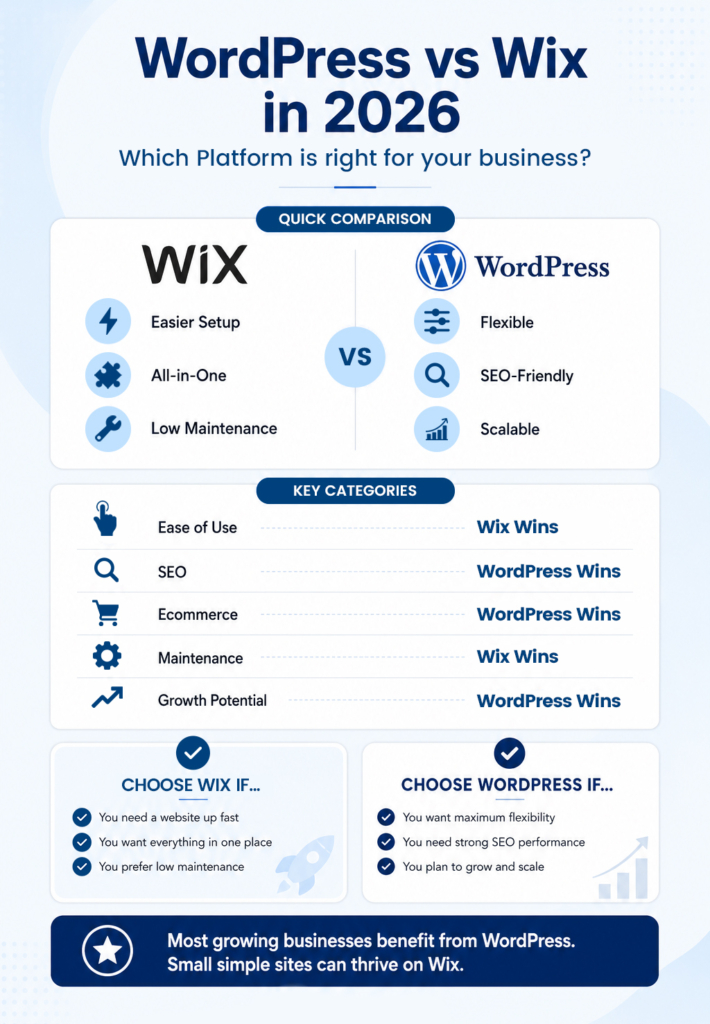
Wix is easier. Full stop. The editor is intuitive, the learning curve is shallow, and a non-technical person can build something genuinely presentable in a day. Hosting is included, security updates happen automatically, and you don’t need to understand what a PHP version is.
WordPress requires more. There’s the initial setup: choosing hosting, installing the software, picking a theme, adding plugins for the things Wix includes by default. None of it is especially difficult, but the decisions stack up. And once the site is live, it needs ongoing attention. Plugin conflicts happen. Updates break things occasionally. Sooner or later, something will need a developer.
For a small business owner who’ll be managing the site solo, with limited time and no interest in learning the technical side, Wix is the more honest recommendation. We’ve seen enough abandoned WordPress sites to know that “technically possible” and “practically manageable” aren’t the same thing.
Design Flexibility: Where Does Each Platform Win?
Wix gives you genuine design freedom within its editor. You can place elements where you want them, resize things freely, choose from a wide template library. For most small business websites, the visual output is perfectly strong.
Where it shows its limits is when requirements move beyond what the editor was designed for. Custom post types, dynamic content, complex multi-step layouts, anything that needs to behave differently based on user data. These things hit a wall on Wix. Not because Wix is badly built, but because the simplicity that makes it accessible comes from constraining what’s possible.
WordPress has no equivalent ceiling. A developer can build essentially anything on it. That’s why it’s the platform our WordPress development agency team defaults to for anything with complex requirements. You can see the range in how we built Business Launchpad’s website. The kind of functionality on that build simply isn’t achievable on a hosted builder.
SEO Capabilities: The Real Difference
Wix’s SEO has improved substantially. You can now edit meta titles, descriptions, header tags and alt text without workarounds. Google Search Console integration works. Basic on-page SEO is doable.
But SEO at any serious scale needs more than basics. WordPress with a plugin like Yoast or Rank Math gives you granular control over crawl behaviour, canonical tags, schema markup, XML sitemaps and redirect management. More importantly, it gives your SEO specialist or agency the access they need to do their job properly. Wix’s closed architecture means there are elements you simply can’t touch.
The structural argument is stronger still. A content-led SEO strategy involves dozens or hundreds of pages, category structures, internal linking logic, and technical configurations that compound over time. Wix can support a blog. It doesn’t support serious content architecture. For the best website builder for small business UK purposes, if SEO is a meaningful channel for you, this is the point where WordPress becomes the only practical answer.
Ecommerce: WooCommerce vs Wix Stores
For a business selling a small product range with a straightforward checkout, Wix Stores works fine. It’s quick to set up and doesn’t require any technical knowledge.
The moment requirements get more complex (subscription products, variable pricing tiers, custom shipping logic, wholesale accounts, integration with a fulfilment system), Wix Stores starts to strain. Apps can extend it to a point, but you’re stacking paid subscriptions onto an already limited foundation.
WooCommerce handles serious ecommerce well. It’s free at its core, deeply extensible, and integrates with practically every major third-party system. The trade-off is setup complexity and the ongoing maintenance that comes with any WordPress install. For a business where ecommerce is central to the operation, that’s a reasonable trade.
Neither platform is the right choice for high-volume retail. Shopify owns that space. But for small stores, the question comes down to how much growth you’re anticipating.
Costs: What You’ll Actually Pay Over Time
Wix pricing runs from roughly £10 a month for a basic site to £22-25 for ecommerce. Everything included. No hosting bill, no plugin subscriptions, no surprise costs from a failed update requiring developer time.
WordPress costs are more variable. Budget hosting starts at £5-10 a month. A quality theme is typically a one-off £50-100. Then SEO, security, performance and form plugins: probably another £150-200 annually. A custom build from an agency costs more than a Wix equivalent upfront.
But the comparison shifts over time. Wix subscription costs compound and pricing has risen consistently. A WordPress site built properly tends to have modest ongoing costs once it’s established. And if you build on Wix and outgrow it, the migration isn’t free. We’ve had clients come to us after two or three years on Wix needing exactly that work. By that point, the apparent savings from the cheaper platform have long evaporated.
Maintenance and Security
This is where Wix has a clear, practical advantage for non-technical owners. Platform updates, security patches, backups: all managed by Wix. You don’t think about it.
WordPress needs active maintenance. Updates to core, themes and plugins need to happen regularly. Outdated installs are the most common cause of compromised WordPress sites. It’s not that WordPress is insecure (a well-maintained site is extremely safe), but maintenance has to be someone’s responsibility.
That someone is either you, your hosting provider if you’re on a managed plan, or an agency. We handle this for clients as part of ongoing support. If maintenance is a concern, it shouldn’t be a reason to avoid WordPress. It should be a reason to factor that support into the budget.
Which Platform Should You Choose?
For most businesses we work with, the answer is WordPress. Not because it’s always the superior product in isolation, but because ambitions for a website tend to grow. What’s a five-page site today is often a ten-page site with a blog, landing pages and integrations a year later. WordPress handles that progression. Wix tends to hit its ceiling at exactly the moment a business starts taking its web presence seriously.
That said, Wix is the right call for some businesses. If you need something up quickly, you’ll be managing it yourself, the site is relatively simple, and search isn’t a primary growth channel, it does the job well. We offer Wix website design services and we’ll always recommend whichever platform actually fits the brief rather than defaulting to one answer.
It’s also worth knowing that this WordPress vs Wix comparison doesn’t cover every option. There are newer builders (Webflow, Framer, Lovable) that sit in interesting positions between the two. We’ve written about comparing WordPress against other modern builders if you want to weigh those up before deciding.Not sure which direction makes sense for your project? Talk to us about your website build.
Book a Free SEO Discovery Call